

In a nutshell:
- Pillar pages are the SEO strategy that lets you dominate an entire topic—a comprehensive hub article linked to thematically related cluster articles.
- We’ll show you how pillar pages are structured, which topics are suitable for them, and how to turn existing content into a pillar cluster.
Have you heard of the term “pillar page”? If not, you might be missing out on an SEO superpower.
The term “pillar page” is still relatively new, but SEO experts now swear by pillar pages and their associated content clusters. These have the potential to increase organic traffic and user dwell time—both key factors for SEO.
Since search engines are constantly refining their algorithms, SEO strategies must also be continuously updated. While keywords used to be the focus, content now takes top priority when it comes to SEO. Pillar pages offer the opportunity to build a clear content structure centered around the ideal target audience for your business or blog.
In this article, you’ll learn more about pillar pages and how you can use them for your website.
Pillar Page: Definition
A pillar page deals with a topic in depth and can be several thousand words long. “Pillar” means “column” in German, which describes the purpose of a pillar page quite well: Pillar pages are “main pages” that link to additional subpages or subtopics (also known as cluster content). Each of these subtopics is covered in a blog post that is linked from the pillar page.
Links from the individual content clusters lead back to the pillar page, creating a cohesive topic area. Users can easily navigate the website and quickly find the information they’re looking for. That’s why pillar pages could also be described as signposts on a website.
Although “Pillar Page” contains the word “page,” this does not mean that it must be entered as a page in the content management system. Pillar Pages can also be located within a blog.
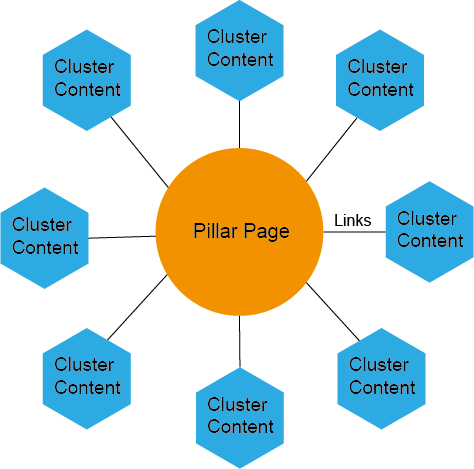
This diagram shows how the pillar page is connected to the content clusters.
For example, if you’re a nutritionist, you could write a pillar page on the topic of “Dietary Supplements for Athletes.” The goal of the pillar page should be to give readers a solid introduction to the topic and answer all their key questions.
Of course, a pillar page cannot cover every detail of a topic, which is why further blog articles are linked within the pillar page, such as those on topics like “Vitamin B12.” The resulting collection of topics is then referred to as a content cluster.
Since pillar pages are much more detailed than blog posts, they can also be used in the form of PDFs as “freebies” or content offers for lead generation. A pillar page should be at least 3,000 words long. Very good pillar pages sometimes contain more than 5,000 words.
Pillar pages also offer several SEO benefits. The high number of internal links on a pillar page improves link juice, which is then passed on to the ranking of the entire website.
What is a content cluster?
Content clusters or topic clusters are an important component of pillar pages, as they complement them with detailed subtopics. These subtopics each get their own blog post.
The possibilities for content clusters are very diverse, and when selecting suitable subtopics, it always depends on the goal you’re pursuing with the pillar page. This could be, for example, increasing organic traffic or lead generation.
Content clusters help your website rank better for keywords that your users are searching for. In the past, it was often recommended to create individual blog posts for specific keywords. Now, pillar pages are becoming increasingly popular because they better cater to people’s search behavior, as they are more structured and organized.
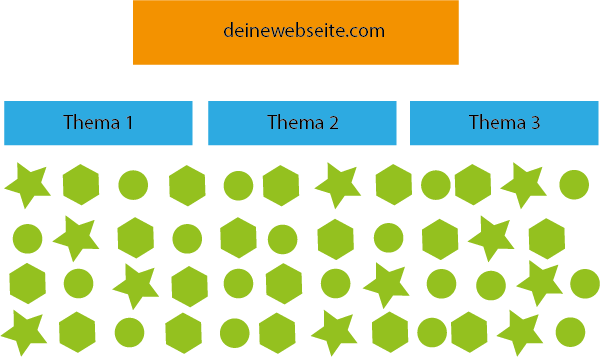
So far, most websites are structured as shown in the diagram. The various icons represent individual blog posts on one of the three topic areas.
However, an unstructured blog layout can cause individual blog posts to compete with one another, thereby negatively impacting each other’s rankings.
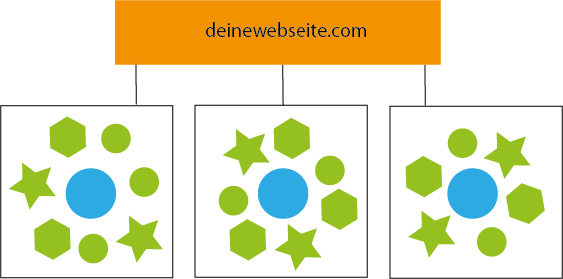
Due to updated algorithms, website structures should look different today, as shown in the diagram above.
To achieve the best rankings, you can define topic areas for which you create a pillar page (blue dots). The individual blog posts are arranged around them (green symbols).
If you build your blog structure around the pillar page, this increases your website’s search engine authority. This, in turn, has a positive impact on your site’s ranking.
Strategic Content Planning
A pillar page should include at least six content clusters. However, these do not necessarily all have to be published at the same time. On the contrary, when creating your pillar page and content clusters, you can tailor your strategy to what works best for you.
For example, you can write the pillar page first and then the individual content clusters. Or you can create the content clusters first and then consolidate them into a pillar page. Which approach works better for you depends on your subject area.
Before you start creating the pillar page and content clusters, you should conduct strategic content planning. This will help ensure that your pillar page generates organic traffic later on.
When planning your content, you should also define the goals you’re pursuing with the pillar page strategy. So, think about which search intent you’re addressing with the pillar page.
Here are the key points to consider during content planning:
- Under which keywords should our website be found?
- Is the main topic broad enough to generate enough content clusters?
- What is the monthly search volume for the main keyword?
- How can we integrate existing content into the pillar page?
- What happens to existing content that we can’t integrate into the pillar page?
When brainstorming, you can use a mind map as a tool, for example. In the center is the core topic around which the pillar page revolves. Arrange the related content clusters around it and connect them to the core topic with lines. These will later become the blog posts that complement the pillar page.
When planning, keep in mind that this is an ongoing process that cannot be implemented all at once.
What has changed in search engine optimization?
Google’s algorithm is constantly changing and adapting to people’s search behavior to deliver the best possible results. These trends are emerging:
Longer search queries
Imagine you’re looking for a sushi restaurant. Would you search for “restaurant” on Google, or for “sushi restaurant nearby”?
If you chose the second option, you’re part of the majority, because 64% of all searches consist of four or more words. Long-tail search queries are becoming increasingly common.
This is partly due to the increased use of voice search. About 20% of all mobile Google searches are conducted via voice command thanks to devices like Amazon Echo or Google Home.
Another reason for longer search queries, however, is that there is now a vast amount of content available. To find what you’re looking for, detailed search queries are necessary today. These are often fully formed questions.
Synonyms and Content Structure
Google now recognizes synonyms as well. So if you search for running shoes, Google will also show you results for sneakers.
But what does this mean for blogs and websites? Content must be organized so that visitors can find the information they need as quickly as possible.
For example, a blog should be structured around specific main topics, supported by blog posts on subtopics. After all, the slogan “Content is King” still holds true, and high-quality content is becoming increasingly important. In fact, this content is now taking on almost journalistic qualities, making it hardly inferior to professional journals.
There is also a trend toward longer texts. While it used to be possible to achieve strong rankings with short but well-optimized texts, that is no longer the case today.
For example, simply stringing keywords together will get you penalized by search engines, as they now understand the context of posts and recognize synonyms as well as related content.
Why should you create a pillar page?
As previously explained, pillar pages offer several advantages. Here’s a quick overview of why you need one or more pillar pages for your website.
Content Structure
A pillar page gives your website’s content structure by linking to related posts, which are also linked to one another. This internal linking also strengthens the ranking of the entire website.
SEO
Google’s Webmaster Guidelines state that a website should be helpful and informative. The guidelines also recommend conducting a keyword analysis, with keywords clearly and accurately described in the website’s content. Additionally, websites should have a clearly structured page hierarchy.
When implemented correctly, pillar pages meet all these guidelines.
Pillar pages align with human search behavior
While human behavior is difficult to predict, general statements can be made about our search behavior. This is because we often search not just for a keyword, but for answers. While keywords are only part of an answer, real answers are more diverse and context-dependent.
To deliver even more precise results, Google strives to cater to human search behavior as effectively as possible. Consequently, relationships and context are becoming increasingly important in the development of search engine algorithms.
Pillar pages most closely align with human search behavior.
More Reasons for Pillar Pages
And if you need even more reasons to integrate a pillar page into your site, here’s a whole list:
- Users tend to search for complete sentences or questions rather than individual keywords.
- Holistic, high-quality content is becoming increasingly important when it comes to search engine rankings.
- Longer texts help your website achieve better rankings.
- Pages with poor content can negatively impact your rankings.
- The website gains a clear structure, allowing users to quickly find the information they’re looking for.
Different Types of Pillar Pages
There are different types of pillar pages. On the one hand, there is the 10x content pillar page, and on the other, the resource pillar page.
10x Content Pillar Page
The 10x Content Pillar Page is currently the most common type of pillar page. Its goal is to be ten times more valuable than other resources on the same topic.
As mentioned earlier, this pillar page covers a main topic and supplements it with subtopics that are linked to.
The 10x Pillar Page is particularly useful for increasing a website’s visibility and thereby boosting its organic traffic.
Possible titles for such pillar pages could include: “Everything You Need to Know About X,” “The Complete Guide to X,” “What Exactly Is X?” or “How-To: How X Works.”
Resource Pillar Page
The goal of the Resource Pillar Page is to become the best resource on a specific topic. To do this, it links to various external sites that provide readers with further information.
The resource pillar page aims to offer the greatest possible benefit to readers, even if it sends them away from the site.
Compared to the 10x Pillar Page, which is written in detail, the Resource Pillar Page is more of a collection of further links. This makes it similar to a glossary.
How to Find Core Topics and Topic Clusters
When choosing your core topics, make sure they aren’t too broad but also not too narrow. That means they should be broad enough to form content clusters, but not so narrow that they can’t form a pillar page.
For example, the topic “social media” would be too broad, and the topic “Instagram captions” would be too narrow for a pillar page.
If you’ve already published a blog post that’s getting a lot of views and raises follow-up questions, this could be a good opportunity to turn it into a pillar page.
Buyer Persona
But how do you find suitable topics for your website or blog? This depends primarily on your target audience—the buyer persona.
You should ask yourself the following questions:
- Who is searching for which keywords or topics?
- What are the searchers’ goals?
- Why are people searching for this topic?
- What questions are people trying to answer with their search?
The better these questions are answered, the greater the growth potential of the pillar page and the cluster content.
Generally speaking, questions tend to be similar across different topics. But even if you’ve already answered a question in another blog post, you should answer it again for a different cluster—just adapted.
There are questions that customers always ask themselves on their buyer journey, such as the “Big 5 Topics.” These include costs and prices, comparisons, problems, rankings, and reviews. These topics should definitely be covered by your content, as they drive the most traffic.
Creating Your Pillar Page
After all this talk about the pillar page, the question now is how best to create one.
First, you should be clear about which topics you want to rank for. From there, you can brainstorm ideas for blog posts.
Creating a pillar page isn’t something you can just do on the side, as the effort involved varies depending on the competition and the existing content of your website.
Below, you’ll learn step by step how to create a pillar page.
Analysis of Existing Content
The first step is to analyze your existing content, as this forms the foundation for developing the pillar page concept.
To do this, list all your website’s URLs in an Excel spreadsheet and add all relevant information, such as organic traffic, session duration, and bounce rate. You can find these metrics in your Google Analytics or HubSpot account.
Using an SEO tool like Sistrix, you can now analyze which main keyword a post currently ranks for. You should then record the main keyword along with its monthly search volume and current ranking position.
Analyzing existing content also helps identify which pages aren’t performing well. From an SEO perspective, it’s recommended to delete or deindex irrelevant pages, as reducing the number of pages ensures Google’s crawl budget is used only for relevant pages. This means only important pages are crawled, improving the website’s visibility.
Choose a core topic
You can select the core topic of your pillar page based on the questions your target audience has about a specific topic (see above). You can also define multiple core topics and create additional pillar pages.
For a given keyword, look at the first page of Google search results to see how difficult it is to rank for that keyword. It becomes difficult, for example, if your page would be competing with many strong sites such as Wikipedia or newspapers. In this case, it’s better to switch to a different keyword.
Determining the relevance of the core topic
The relevance of the core topic can be determined, for example, using metrics such as search volume. Of course, this must also be relevant to the target audience you want to reach with your website. Therefore, check whether your ideal target audience is actually interested in the topic. Because if you write about topics that hardly anyone searches for, you won’t be able to drive organic traffic to your website.
Content Cluster Ideas
Once you’ve defined the core topic of your pillar page, you can focus on the content clusters. The best approach is to spend a few minutes jotting down all the ideas that come to mind regarding the core topic. You can then research each idea in more detail, ideally using keyword tools like AnswerThePublic. This will help you determine whether they’re suitable for a content cluster or not.
You can also refer to the Excel spreadsheet you created for your existing content. Consider which of your previous posts fit into the new content cluster. Then, add a column titled “Pillar Page” to the Excel spreadsheet and mark all the content that should be linked.

Your Excel spreadsheet could look something like this, for example.
Create Content
If you have existing content that you can integrate into the pillar page, the next step is to create blog posts on the subtopics. Review the existing blog articles and ensure they are up-to-date and of high quality. Revise the posts if necessary. Write new blog articles on the missing topics, publish them, and link them to the pillar page.
Writing the pillar page
In the first section of the pillar page, you should introduce readers to the main topic of the pillar page. This is followed by an outline with the individual chapters. It’s best to include jump links for each point in the outline so that users can jump to the chapter that interests them.
In the next section of the pillar page, you can now define and summarize the main topic. In the following sections, the subtopics are only briefly touched upon, as users can read about the subject in more detail in the related cluster content. The pillar page is therefore a summary of the cluster content.
Make sure the pillar page consists not only of plain text, but also of images, infographics, and videos. This not only increases interest but also the time readers spend on the page.
Here are a few on-page SEO tips for creating the pillar page:
- The main topic should be included in the page title, the URL, and the first subheading.
- The beginning of the pillar page should include a brief definition, as this increases the chances of a featured snippet on Google.
- Add a navigation bar that scrolls with the page.
- Include the main keyword in the alt text of the images.
- Use H2 tags for sections.
- Link to external sources to reinforce a fact.
- Add a “Back to Top” button.
Set up links
There’s one thing you should pay special attention to: Only link to individual blog posts using the respective main keyword. This signals to the search engine which keyword the page can be found under. Therefore, be sure to avoid link text such as “click here” or “learn more.”
Integrate a content offer
Especially if you want to use the pillar page for lead generation, you should integrate a content offer, such as a free download. This should be presented with an appealing call-to-action. It’s best to place the content offer at least once on the pillar page.
Publish and promote the pillar page
After you’ve created the pillar page, you’ll need to promote it so users know this content is available. You can promote the pillar page on social media, for example, as well as in newsletters or through ads.
Maintaining the pillar page
Just like any other post published on your site, you should regularly update and expand the pillar page. At least once a year, you should update your content with the latest studies, figures, and data.
Even a pillar page can never cover a topic completely, which means you’re never quite finished.
The best way to stay on top of things is to work with an editorial calendar. In it, you can note when the last update to a post took place and when the next one will be.
Also, always check the performance of your pillar page. You can ask yourself the following questions:
- Is organic traffic growing?
- How are our site’s off-page SEO factors faring (e.g., load times and user-friendliness)?
- Are there posts in the content cluster that are stagnating?
- Do visitors bounce off the page quickly, or do they browse other posts?
Conclusion
With a little more structure, you can improve almost any blog or website. Pillar pages aren’t just great for SEO, but also for improving blog structure and content. Since pillar pages align perfectly with our search behavior, you can achieve good search engine rankings over time with them.
Nevertheless, working in a structured manner remains the top priority when creating pillar pages. Success with pillar pages can only be achieved with the right foundation. Therefore, make sure you have a solid content plan before you start creating the pillar page. This is the best way to write comprehensive and solution-oriented posts.