

In a nutshell:
- TYPO3 v14 LTS has been the standard since October 2024 — v10 has been out of free support since April 2023, and v11 since October 2024.
- Anyone still running v10 or v11 without ELTS is operating without security patches.
- A major update can cost anywhere from four to five figures, depending on your extension setup. We’ll show you what drives the cost and how to spot a realistic quote.
TYPO3 v13 LTS is current — v10 has been out of free support since April 2023, v11 since October 2024. Anyone still on an older version has open security vulnerabilities. Depending on the number of extensions, an update costs between €2,000 and €15,000. We’ll show you how the effort is calculated, where hidden cost drivers lurk, and how to recognize a realistic quote.
In this post, we’ll also discuss the effort and costs involved in a TYPO3 update, as these go hand in hand. The greater the effort, the higher the costs.
TYPO3 Update – Security, Performance, and More
TYPO3 is an open-source content management system that is constantly being developed by its diverse community.
First, it’s important to distinguish between a TYPO3 upgrade and a TYPO3 update, as the two terms are very similar.
TYPO3 Upgrade
An upgrade is performed when an update to the major version is due (for example, from version 10.4.31 to 11.5.13).
TYPO3 Update
A TYPO3 update, on the other hand, occurs when the minor version needs to be updated. This involves minor adjustments, such as bug fixes (for example, from 11.2 to 11.5.13).
In general, a major upgrade involves more effort than a minor update and therefore also comes with higher costs. In the following article, however, we will use the term “update,” as it is more widely used and is the colloquial term.
Why should a TYPO3 update be performed?
Would you use a cell phone that hasn’t been updated in two years? Probably not. Because old cell phones are incompatible, slow, and limited in their functions. The same applies to your TYPO3 website.
A website that hasn’t been updated in a long time is more vulnerable to hacking, and personal data can be stolen. That’s why you should never skip a major TYPO3 update.
How much does a TYPO3 update cost?
There’s no one-size-fits-all answer to this question, as the cost of a TYPO3 update depends on the amount of work required. While TYPO3 is free as an open-source content management system, the front-end and back-end of the website need to be “cleaned up” after an update—a TYPO3 update creates a bit of chaos that must be resolved by a web developer.
Why you should perform TYPO3 updates
There are many reasons for regular TYPO3 updates. As mentioned earlier, TYPO3 updates should not be neglected or skipped. If there are long intervals between updates, a website relaunch may make more sense.
You should keep your TYPO3 website up to date with the latest technology for the following reasons.
Security
All content management systems are regularly targeted by hackers. However, the security vulnerabilities that result from this are simultaneously patched by the TYPO3 developers. Only those who install the latest version benefit from these fixes.
Furthermore, according to Section 13(7) of the Telemedia Act, website operators are responsible for the security of their websites by protecting their visitors from external attacks. Under the General Data Protection Regulation, website operators are also required to use up-to-date software. This includes ensuring that the technologies used are current. Website operators risk heavy fines for violations of the Telemedia Act.
Even if your website hasn’t experienced any security issues for years, neglecting updates creates a risk of hacker attacks. These can also occur automatically and affect websites of all sizes. The consequences often include lost orders or sales, or harm to third parties, such as the theft of customer data.
New Features
TYPO3 updates also affect a website’s functionality. As TYPO3 evolves, new features are constantly added, and old ones are improved or simplified. For example, an update may refresh the user interface, analytics, forms, search functions, or responsive design. The latter, in particular, is becoming increasingly important as the use of websites via mobile phones or tablets continues to grow.
Compatibility with end devices and web browsers also plays a role. Since these are constantly evolving, content management systems must also be updated on an ongoing basis.
Technical Standards
Internet browsers like Google or Bing are constantly refining their search algorithms. To ensure websites remain discoverable, the content management system must also be updated on an ongoing basis.
An up-to-date TYPO3 version enables a website to utilize new technologies. For example, this reduces loading times or improves the website’s performance. Both of these factors are also part of Google’s ranking criteria, resulting in benefits for both users and website operators.
Web hosting infrastructure is also evolving, leading to the introduction of new features or the replacement of old ones. However, this can result in limited functionality of the TYPO3 backend or the inability to use new features. New TYPO3 versions should therefore be installed regularly to ensure the website continues to function smoothly.
Costs
Technical maintenance of websites should not be neglected. If it is, follow-up costs can quickly add up. Skipping TYPO3 updates can lead to chaos in the frontend and backend of the website, resulting in more work and thus higher costs. Regular updates therefore help with planning and cost savings.
PHP Versions
Without updates, your website cannot remain online indefinitely. This is primarily due to the PHP programming language on which TYPO3 is based. Similar to TYPO3, there are also different versions of PHP that are continuously being developed. However, the PHP version used to build your website is determined by your web host. This is because your web host may disable outdated PHP versions, which in turn affects your website’s functionality. Those who perform regular TYPO3 updates are therefore on the safe side, as these updates also update the PHP version.
Types of TYPO3 Updates and Installation Timing
As explained in the introduction, there are two types of TYPO3 updates: minor and major updates.
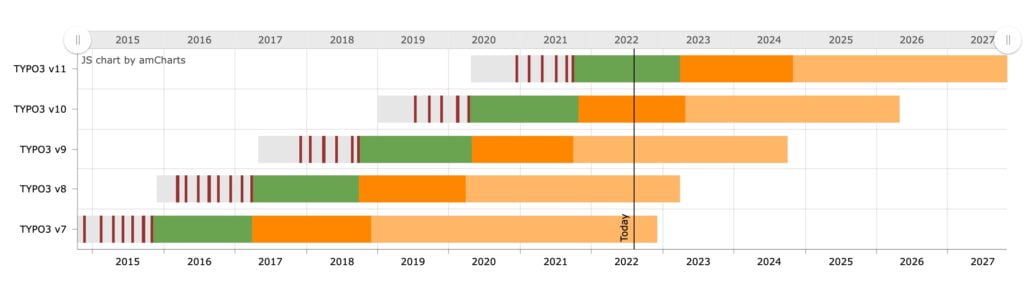
TYPO3 major versions are released in regular cycles of approximately two years. During these cycles, partial updates provide security patches and new features. Once all necessary stabilization work has been completed on a major version, it is designated as Long-Term Support (LTS) after one to two years. The LTS phase, during which the TYPO3 version continues to receive security updates, lasts at least three years. After these three years have elapsed, Extended Long-Term Support (ELTS) can be purchased for a one-time fee. This provides security updates for an additional two years.
Minor Updates
Minor updates are released several times a year and include minor updates, such as bug fixes or security patches. These are sometimes also called patches.
Installing minor updates takes less time than a major update, which is why the costs are significantly lower and do not exceed the two- or three-digit range.
Minor updates should not be skipped, as they reduce the effort required for a major update and thus save costs. The security updates included in minor updates also provide protection for the TYPO3 system.
Major Updates
Major updates (also known as main updates or full updates) refer to the updating of the entire TYPO3 content management system. They involve major changes to the TYPO3 system that affect both the backend and the frontend (the user interface). For example, a major update may include new features or plugin extensions.
Depending on the size and functionality of the website, the cost of a TYPO3 major update is in the lower four-digit range. Major updates are released approximately every one to two years.
Skipping major updates is not recommended. To ensure the website remains future-proof, major updates must be performed regularly.
How can you tell if it’s a TYPO3 minor or major update?
You can find the number of your current TYPO3 version on the developer site under “Releases.” You’ll need this so we can compare it with the version number of your TYPO3 system.
If the first set of digits in your current version number differs from that of the latest TYPO3 version—such as 6.2.12 and 7.2.12—a major update is imminent. If the first set of digits is the same and only the second set differs, it is a minor update. Differences in the third set of digits indicate a patch update.
How much does a TYPO3 update cost?
It can be difficult to estimate the exact cost of a TYPO3 update because it depends on the scope of the website and other factors. That’s why you should always contact a trusted agency that can perform a free analysis and initial assessment.
In general, however, you can use these guidelines as a reference:
- TYPO3 Patch: Up to €100
- TYPO3 minor update: up to €100
- TYPO3 major update: from €1,000 to €4,000
- Multiple TYPO3 updates: at least €3,000
These factors influence the cost of a TYPO3 update
- Number of version jumps
A version jump means that a system is updated from version 7.3 to version 8.2. If major updates were skipped in the past, multiple version jumps must be performed in succession, which results in greater effort.
- Extensions
The more TYPO3 extensions are used, the greater the effort and, consequently, the costs. Sometimes, no update is available for an extension, which is why it must be manually adapted by an agency.
- Multilingualism
Updating a bilingual website in TYPO3 requires more effort than updating a monolingual website. However, the effort for websites with more than two languages remains almost the same as for two languages.
Small, single-language websites with few extensions or subpages therefore incur costs at the lower end of the spectrum. Medium-sized websites that include multiple languages and more than a hundred pages can quickly move into the upper range of the price spectrum. For large corporate websites, for example, costs can exceed €10,000.
For TYPO3 minor updates, a consistent maintenance service provided by a TYPO3 agency is advisable. The costs for this depend on the TYPO3 system used and its functionalities. Maintenance service fees are often billed monthly. But even though this involves a monthly expense, it’s worth installing minor updates regularly, as they have the potential to reduce the effort (and thus the costs) associated with a major update.
When does a TYPO3 update need to be installed?
The question could also be: Does a major TYPO3 update need to be installed immediately? The answer is: No. Security updates are still available for older versions, even after a new version has been released. This so-called LTS (Long-Term Support) version is therefore still considered secure.
At the latest when the period marked in orange on your TYPO3 roadmap has passed, you should perform a major update. Only then is the security of the website guaranteed.
While you can take your time when installing major updates, you should apply minor updates and patches promptly. These address security vulnerabilities that would otherwise leave your website susceptible to attacks.
When is a TYPO3 update advisable?
Partial updates should always be applied, as chaos can occur in the frontend and backend of the website, especially immediately after a major update. Partial updates stabilize the current TYPO3 version and also close security vulnerabilities.
It is also recommended to update the major version regularly. However, this does not necessarily have to happen immediately after the release of a major version, as plugins developed by the TYPO3 community often need a few months to be adapted.
When does a TYPO3 update not make sense?
In some cases, it may be more cost-effective to skip the TYPO3 update. For example, an update is not recommended if the current system is more than three versions behind. If websites have been poorly programmed, it also makes little sense to install an update, as there is already chaos in the website’s backend. Therefore, it sometimes makes more sense to look for alternatives or to reprogram a website from scratch.
Can we perform a TYPO3 update ourselves?
In principle, it would be possible to install a TYPO3 update yourself. However, this also depends on your programming skills. While minor updates are usually easy to install using the TYPO3 Update Helper, major updates require programming knowledge.
How does a TYPO3 update work when handled by an expert?
After a TYPO3 update, your website won’t look exactly the same as before—not just in the backend, but also in the frontend. This is because updates involve changes to the system’s underlying technology, which then alter the website’s appearance.
To correct these unintended changes, the programmer must first get a sense of the updated website. The website is then adjusted as closely as possible to the design it had before the update. If you’re okay with minor deviations, such as in spacing, the programmer has less work to do, which also lowers the cost.
Conclusion
Not updating is not an option. Neglecting major and minor updates puts the security and functionality of your website at risk. That’s why regular TYPO3 updates are worthwhile not only in the short term but also in the long term.
Do you have questions about TYPO3? Take the first step now and let us help you keep your website up to date.
Contact us
Want to know exactly how much your TYPO3 update will cost?
We’ll provide a no-obligation cost estimate for your installation—even if you’re currently with another agency. Submit a request or view our TYPO3 services.