

TL;DR
- By 2026, Google Business Profile will be the most important visibility channel for local small and medium-sized businesses.
- Often more important than your own website.
- We explain how to set it up and which fields determine whether you get inquiries.
- Benefits: Get found on Google Maps and generate leads.
In a nutshell:
- Google Business Profile will be the most important visibility channel for local SMEs in 2026—often more important than their own website.
- We explain what a Google Business Profile is, how to set it up, and which fields determine actual inquiries from Google Maps.
What do you do when you’re looking for a restaurant, store, or hotel? You most likely turn to Google. In 2022, the search engine has a global market share of 91%, far surpassing Bing or Yahoo.
Local businesses can create a so-called Business Profile on Google, where key information such as opening hours or address is stored. This can be a great opportunity, especially for smaller businesses, to be discovered by customers online.
However, if you own a local business, you don’t have full access to all features. That’s why you should create a Google My Business profile—an effective <adata-wpil href="https://waterproof-web-wizard.de/blog/internationale-mehrsprachigen-websites-geotargeting/" data-wpil-monitor-id="65" class="lnk">SEO and lead generation tool that gives you control over your business profile.</adata-wpil>
What is Google My Business?
As mentioned earlier, Google My Business is a tool that helps you manage and optimize your company’s business profile. But before we dive deeper into Google My Business, let’s first talk about the business profile.
The business profile refers to the list of stores, restaurants, service providers, or similar businesses that appear in search results.
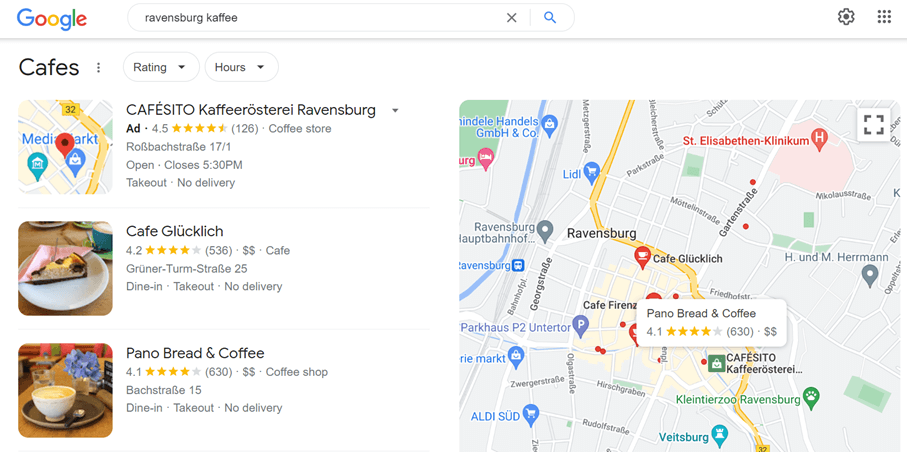
The “business listing” looks like this, for example. (Image source: © google.de)
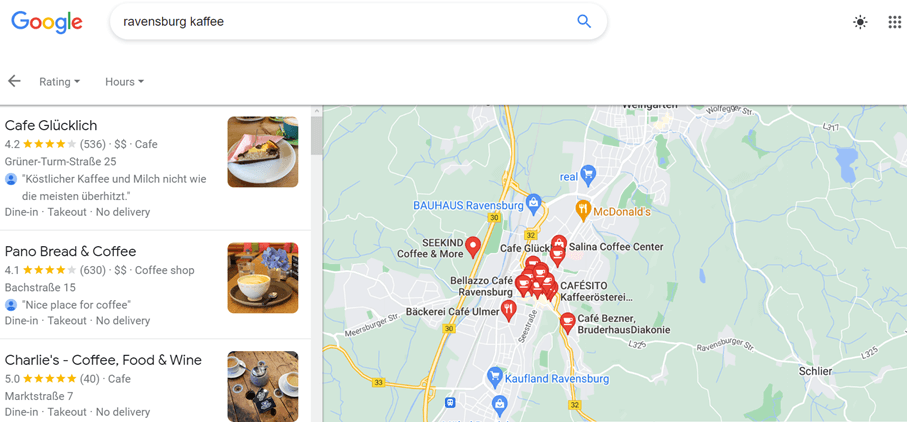
On Google Maps, it looks like this. (Image source: © google.de)
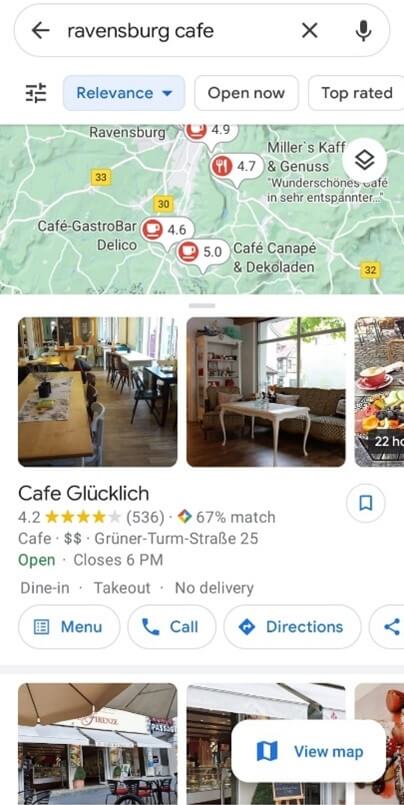
And on mobile phones, the listing looks like this. (Image source: © google.de)
Creating a business profile is the same as adding a location to Google Maps—something anyone can do. All Google needs for a business profile is a name, location, and category. After that, the profile is public, which means customers can leave photos, reviews, and questions. Sometimes the profile is also supplemented with data that Google pulls from the internet.
In short: The business profile can exist on its own, without a Google My Business account. And regardless of whether you created your business profile yourself or not, you cannot manage the information it contains.
That’s why a Google My Business account is almost essential. With it, you gain editing rights for your business profile. Through a dashboard, you can centrally manage information about your business and make it available for Google Search. Here, for example, you can add contact details, photos, and events. You can also respond to customer reviews. This allows you to optimize your business listing on Google and stand out from the crowd.
Google My Business is completely free and serves as a platform where businesses can influence their image on Google. While in the past, various services like Google Maps, Google Places, and Google+ had to be maintained separately, Google My Business now combines all these services into one.
A Google My Business listing is a bit like a business listing in a digital directory with a much wider reach. A listing is therefore a must, especially for local businesses. Features like the call button allow potential customers to contact the business directly.
Although you can customize and configure many aspects of your Google My Business listing, Google alone decides where your listing appears. So you can’t directly influence your ranking. But with the right settings, you can definitely improve your ranking.
Who is Google My Business for?
Only businesses that have direct contact with customers—such as retail stores, restaurants, or service providers—can create a business profile and a Google My Business account. Online stores, on the other hand, must promote themselves through other channels, such as Google Ads or SEO.
For local businesses, however, Google My Business is an ideal and effective advertising tool, because in most cases, a mobile search for a business leads to a visit within 24 hours. If the business is also marked with a red pin on Google Maps, a visit is even more likely.
A well-maintained and professional business listing is particularly effective at attracting customers and helps you stand out from the competition. Keep in mind, however, that anyone can create a Google business listing. If a listing for your company already exists, you can claim ownership and take over administrative rights.
Why You Should Use Google My Business
There are plenty of reasons why you should use Google My Business for your business. Google has an incredibly large market share, especially in Western countries. For example, China and Russia have their own dominant search engines. In Russia, Yandex is the leader; in China, it’s Baidu.
However, anyone browsing the internet in this country can hardly avoid Google. That’s why a well-optimized business listing on Google is particularly important.
Get found on Google and Google Maps
Whether you’re looking to drive more website traffic or attract customers, Google is your best ally. A Google Business Profile helps your customers find the local businesses or services they’re looking for. The Business Profile serves as an “online business card” for your company.
Google My Business helps you attract new customers and retain walk-in customers.
Control over information about your business
Through your Google My Business profile, you can manage and update information about your business. This includes, for example, your business hours and other important details.
You can also post updates about the services you offer, as well as set your status to “temporarily closed” or “fully reopened.”
Build trust through reviews
Customer reviews serve as “social proof” that a business is trustworthy. Google’s review feature for local businesses allows customers to leave detailed reviews and star ratings. This helps potential customers learn more about different businesses and decide which one best meets their needs.
The reviews are public and visible to everyone, so you can’t control which reviews are published and which aren’t through your Google My Business account. As a result, negative reviews may also be posted.
But don’t worry about that, because Google considers a mix of positive and negative reviews more credible than a listing that only receives great reviews.
Stand out from the competition
Google My Business offers the potential to stand out from the competition and place your business at the top of search results. Those with greater visibility also attract more customers.
Centralized management through Google My Business
Google My Business is the central hub for various features that let you enhance your business profile. For example, you can manage information about your business, upload professional photos, and respond to reviews. You also have access to statistics that show you how users search for your business.
With Google My Business, you can specifically influence how your business is presented on Google.
The statistics on Google My Business show you, for example:
- How users search for your business
- When and how often users contact your business by phone
- Which search queries users use to find your business
- How often photos of your business are viewed compared to other businesses
- Where your listing was viewed (Google Maps or Google Search)
- What actions users take on your listing
- Where users access directions to your business
Google My Business for SEO
Google My Business is also a factor in the ranking of your business listing. You can also connect Google My Business with other products like Google Analytics to track traffic to your website.
Google My Business for Local Marketing
By now, you know that Google My Business and the business profile are not the same thing, because Google My Business is more of a tool you can use to improve the visibility and effectiveness of your business profile.
Here’s how you can use Google My Business to turn your business listing into a marketing tool.
How can Google My Business improve our ranking?
As mentioned earlier, a professionally set up Google My Business profile has a positive impact on your ranking in local search results. Here’s how you can achieve a better ranking in Google’s “Local Pack” using the following settings.
The Google Local Pack refers to the first three search results displayed for a specific search term. You typically appear after the paid ads.
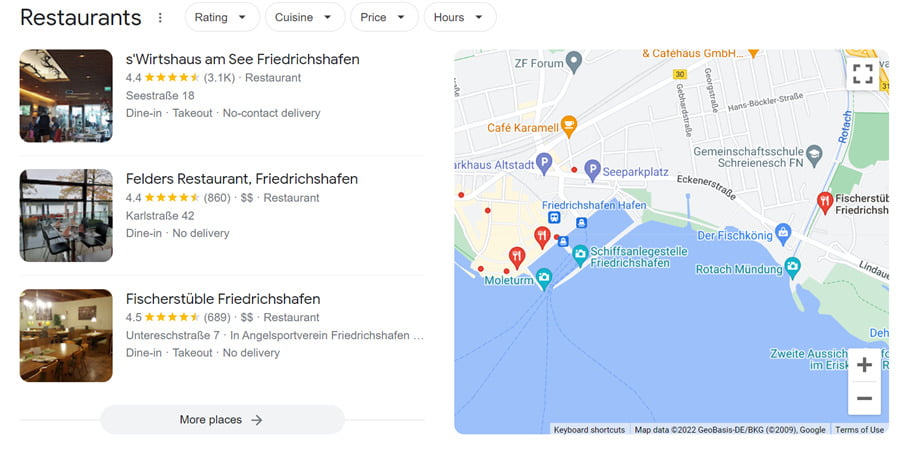
The Google Local Pack looks like this, for example. The top-ranking Google search results are highlighted. (Image source © google.de)
If you’re among the top 3 in Google search results, you’ll naturally get more traffic. You can increase your chances of landing in the Local Pack by focusing on the following factors.
- Relevance: Make sure your business listing includes the most important information. The better the algorithm can capture data about your company, the better your visibility.
- Activity: Business profiles that have been inactive for a long time generally rank lower than active profiles. So be sure to post updates about events or upload new photos of your business. Also, don’t forget to respond to reviews and questions from customers.
- Accuracy: It’s best to double-check your listings and text, as grammatical accuracy is also one of the factors that Google considers in its ranking.
Interaction with Customers
We’ve already mentioned that active interaction with customers is an important ranking factor. With your Google My Business profile, you can respond to reviews and answer questions. You can also set up a direct messaging feature.
Another interesting feature of Google My Business is that you can post regular updates and events, similar to Facebook or other social media platforms.
Highlight your business
While the business profile without Google My Business contains only limited information, you can use the latter to add business hours and additional details. Cool features include, for example, a link to your website, information about products and prices, as well as attributes that describe your business in more detail. These include, for example, attributes related to accessibility or accepted payment methods. However, the attributes depend on the country and region.
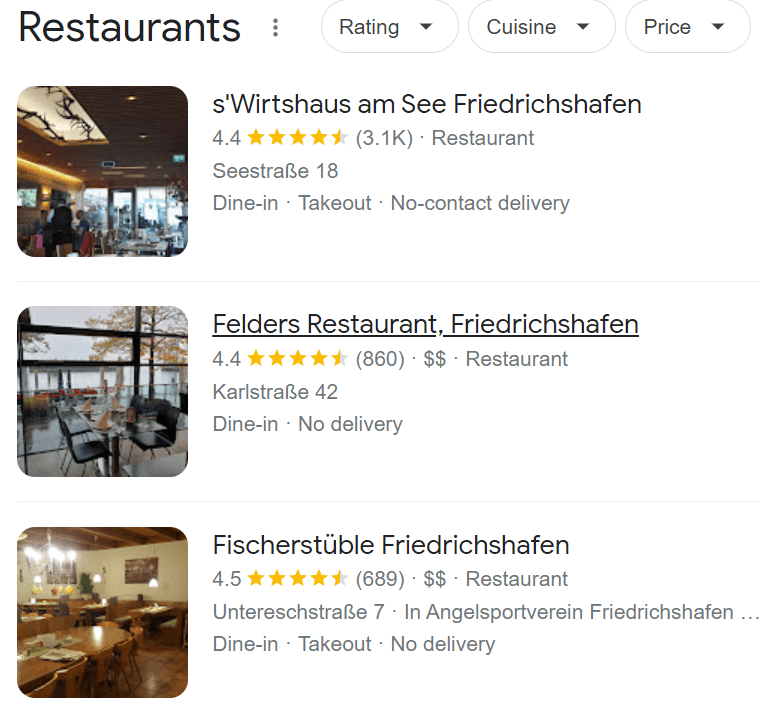
Business attributes here include, for example, “Dine-in” or “Takeout.” (Image source © google.de)
Performance Insights
You can also use Google My Business to collect important data about your customers and the performance of your listing. In the Analytics tab of the platform, you can see the search queries your customers use to find your business on Google. You can also see whether they found you on Google Maps or through regular Google Search.
The statistics also show which features on your business listing are used most frequently. You’ll also see how your photos are performing compared to other business profiles in your category.
You can also set up additional tracking features via Google Analytics.
Local SEO
Today, more than a third of all Google searches are location-based, as more and more people search for businesses or services online. Google also takes the user’s location into account in its search results. To ensure your business is easily found, you should definitely use local SEO to optimize your Google listing and your website.
Google has a ranking system for websites and ads, and it also has one for business listings. Through your Google My Business profile, you can set keywords that help your listing rank higher, so you might even appear in the Local Pack.
However, local search engine optimization isn’t limited to your Google My Business profile. Your website should also be optimized for regional search terms.
What is Local SEO?
Local SEO stands for local search engine optimization. This encompasses all measures designed to push a website as far up the rankings as possible without paying Google to do so (keyword: Google Ads).
Google didn’t introduce local search until 2007. Since then, most people have been using their smartphones instead of phone books to search for businesses, restaurants, or services. Google’s goal is to display search results that are as relevant as possible to the user.
To achieve this, Google has introduced various ranking factors for local search. This naturally includes creating a Google My Business account. Google itself recommends using the platform and regularly updating the information.
Since local searches primarily take place on smartphones, you should ensure that your company’s website is optimized for mobile devices.
How to Use Google My Business for SEO
Google’s business profiles are dynamic, meaning they change depending on the platform. This also means that Google will highlight different parts of your profile depending on the platform. For example, Google highlights certain keywords when the search engine believes the information is relevant to the respective platform.
However, to ensure Google knows which information and keywords to prioritize, you should highlight them in your Google My Business account. Consequently, local SEO works similarly to standard SEO, as it primarily depends on three factors: target audience, content quality, and trustworthiness.
Target Audience
To ensure your profile reaches the target audience you want to address with your products or services, you should add relevant keywords to your business profile. You can use these, for example, in your company description, as well as in your responses to customer reviews and questions. Of course, the keywords should be naturally integrated into the text, just like with any other SEO strategy.
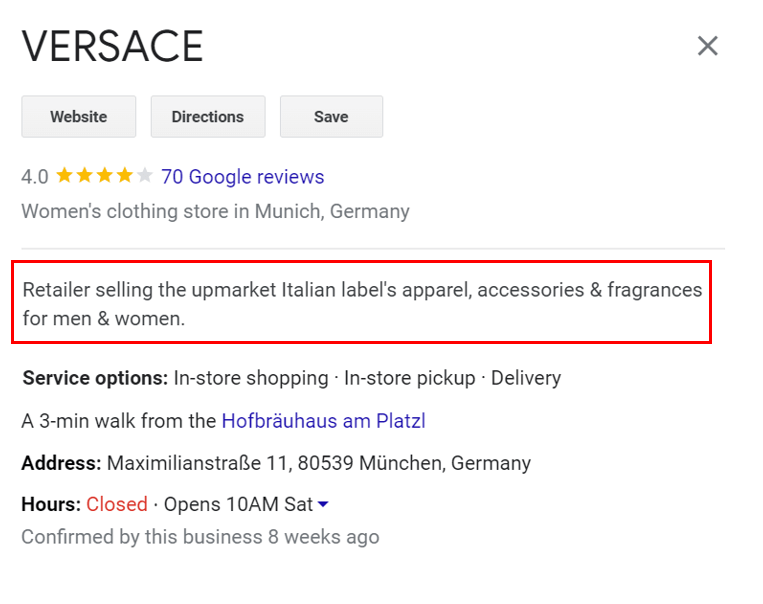
The description appears in the business profile below the location. (Image source © google.de)
In this example featuring Versace in Munich, keywords such as “Italian,” “apparel,” and “accessories” are included. The description is brief but contains all the key keywords that best describe the brand.
Quality of Content
Not only the accuracy but also the completeness of your business profile plays a role in the ranking. Also make sure that the information on your profile is up-to-date and relevant.
Trustworthiness
Just like with “regular SEO,” local search engine optimization is all about building trust with Google and your target audience. This primarily involves responding promptly to customer reviews and questions. You should also signal to the search engine that your business is active and vibrant by regularly uploading photos.
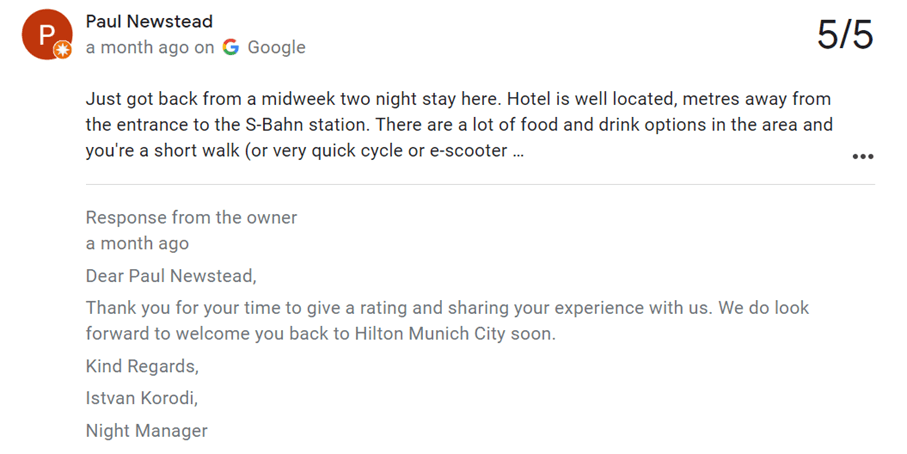
This example from Hilton Munich City shows that it’s also important to respond to positive reviews. (Image source © google.de)
SEO is important for every business, but for small companies in particular, SEO can be a powerful tool for competing with larger competitors. That’s why Google My Business is a real secret weapon for local businesses.
Set up and manage Google My Business
Google often creates business listings automatically. That’s why your business might already have a listing on Google. However, you can claim ownership of the listing through Google My Business.
If there isn’t a listing for your business yet, you should definitely register it with Google My Business.
So how do you set up your Google My Business profile correctly? In this guide, we’ll walk you through the steps to optimize your Google Business Profile.
- Step: Log in to Google Business Profile Manager
If you’re already logged into a Google Account, you’re automatically logged into Google Business Profile Manager. If not, log in to your regular Google Account or create a new account.
- Step: Add your business
First, enter your business name and then select an appropriate category.
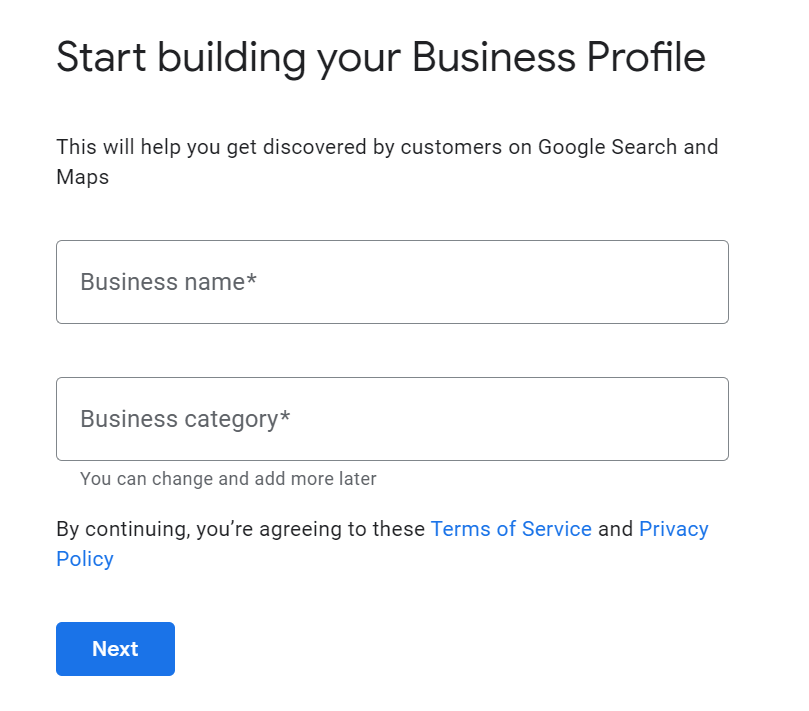
Here, you’ll be asked to enter your business name and category. (Image source © google.de)
- Step: Enter your location
In the next step, you’ll specify whether your business has a physical location that customers can visit. You can answer either Yes or No.
If your business offers in-person services but doesn’t have a physical location, Google will ask you to enter a region where you provide your services.
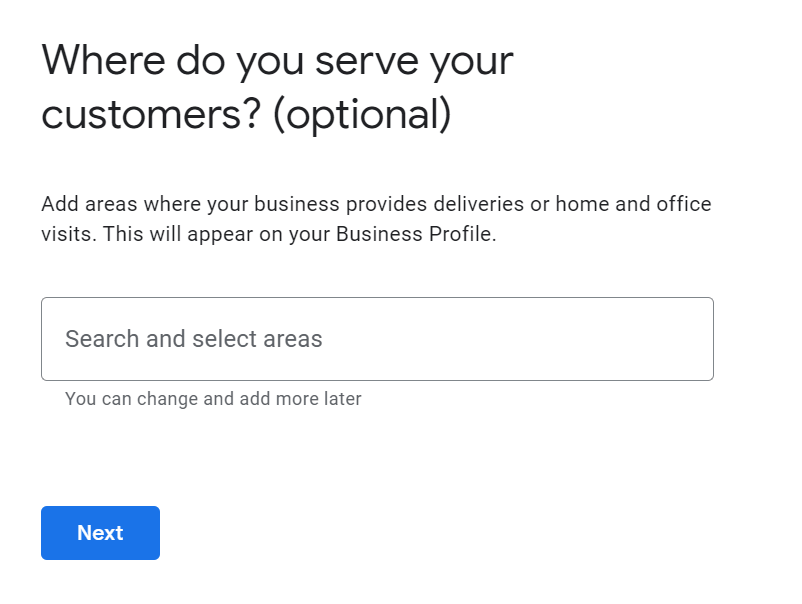
Here you can enter the city where you operate if you do not have an address for your business. (Image source © google.de)
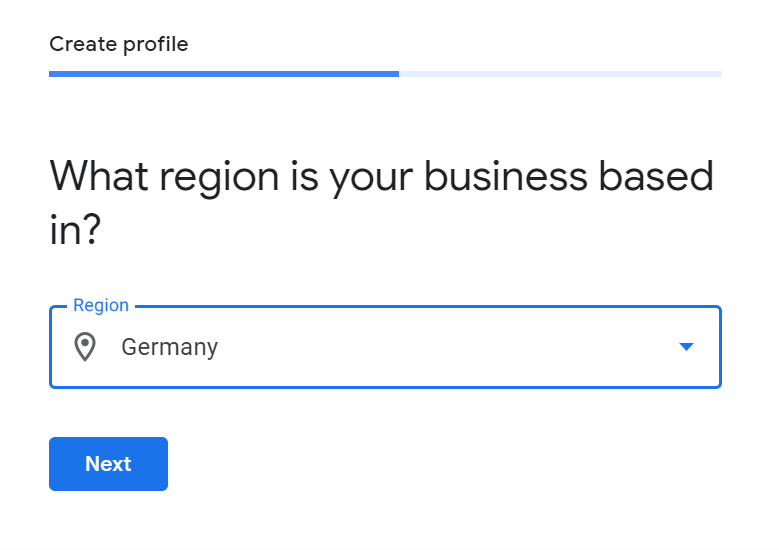
Here you can enter the region where you offer your services or products. (Image source © google.de)
- Step: Enter your contact information
Here you can enter your phone number and website so your customers can reach you. If you don’t want to provide your phone number, you must at least provide a website.
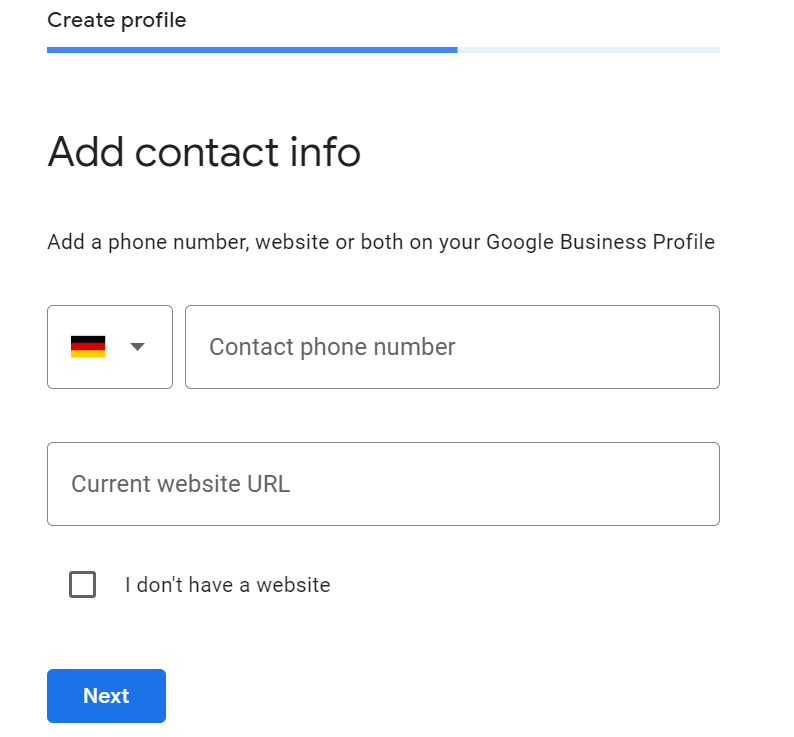
Here, enter your phone number and website. (Image source © google.de)
- Step: Verification
In this step, enter your address. However, this is only used to ensure that your listing is for a real business. The address will not be published on your Google Business Profile.
After clicking “Next,” you’ll see various options for verifying your business. Businesses with a physical location will receive a postcard to verify the address. If your business doesn’t have a physical location, you can verify it via an email address.
Once you’ve received your five-digit code, you can click “Verify” to complete the process.
- Step: Set up your profile
Here you can now enter your business hours, upload photos, and add a description of your business. (Read on to learn how to set these up effectively.) Once you’ve entered the key information, click “Next,” which will take you to the dashboard. From there, you can manage all reviews and messages.
Once you’ve completed your Google My Business listing, it may take a while for it to appear in search results. This is because Google reviews all listings before they’re published. Also, be sure to follow Google’s guidelines for business listings, otherwise Google may not display your listing in search results.
Optimizing Google My Business
Google ranks local search results based on three factors: relevance, distance, and prominence.
- Relevance: How well your Google My Business profile matches the search query.
- Distance: How far your business is from the user.
- Prominence: How well-known your business is, based on the number of reviews, SEO, and links.
You can positively influence your ranking with the following tips.
Complete your profile
Potential customers are 2.7 times more likely to perceive your business as reputable if it has a business profile on Google. The likelihood that they will visit your location is 70%.
According to Google, it’s easier for the search engine to match listings with a complete business profile to the right search query. This improves the relevance score. The key is to let customers know what your business does, where it’s located, and when they can stop by.
Verify your location
Verified businesses appear more frequently in local search results on Maps or in regular Google Search. Having a verified address helps your business rank better for the distance factor.
Add professional images and videos
Your Google Business Profile includes a logo and cover photo. To ensure your image looks polished, you should upload images with high brand recognition. For example, these should align with the tone of your social media presence. This helps people recognize your business.
Your images and videos can, for example, showcase your company’s building, team, and work environment.
If you own a restaurant, you can showcase images of your dishes, menus, and interior design. Make sure these are high-quality and look professional.
According to Google, businesses with photos get more clicks for directions, and their websites also receive more traffic.
Here’s how to add photos to your Google My Business profile:
- Click on “Photos” in the menu on the left.
- Add your logo and cover photo.
- To add more photos, click on “At Work” or “Team” in the top menu.
- You can add videos via the “Video” tab.
Add keywords
Using the right keywords improves your business’s relevance. If you’re unsure which keywords suit your business, you can use tools like Google Trends or Google Keyword Planner. Other tools include Google Analytics or Hootsuite Insights.
Once you’ve selected suitable keywords, use them naturally in your business description. Under no circumstances should you engage in “keyword stuffing,” which involves cramming too many irrelevant keywords into the description, as this can harm your ranking.
Respond to reviews
Since people trust other people more than companies, good reviews are a crucial factor for potential customers. Reviews also improve your ranking on Google.
For example, you can ask your customers for a review after they visit your store or restaurant. Google even offers a direct link you can use to ask your customers for a review.
Here’s how to request the link:
- From the dashboard, scroll down to the button that says “Share review form.”
- Copy the link and paste it into a message to customers, automated emails, or receipts.
You cannot disable the review feature in Google My Business. But that wouldn’t be beneficial for you anyway, since reviews signal to potential customers that your business is reputable and trustworthy. However, you can report inappropriate reviews.
In any case, you should always respond to reviews, both positive and negative. According to a survey by Google and Ipsos Connect, businesses that respond to reviews are 1.7 times more trustworthy than those that don’t.
When responding, make sure to stay true to your brand voice. If you’re responding to a negative review, be honest and offer an apology if necessary.
In the Google My Business dashboard, click the “Reviews” tab to respond to reviews.
Update regularly
Don’t forget to update your business information if it has changed. Nothing is more annoying than incorrect opening hours or phone numbers. If you have different opening hours for holidays or similar occasions, make sure they’re included in your Google Business Profile.
Also use your Google My Business profile to post updates, news, offers, and events.
You can edit your information in the dashboard as well as directly on Google Maps.
Here’s how to add posts:
- From the dashboard, click on "Posts" on the left-hand side.
- Then click on “Create Post.”
- Select the type of post you want to create. This could be, for example, a COVID-19 update, an event, or news about a product.
Add extra features and attributes
Extra features vary depending on the business category. Here’s an overview of which features are available for each category:
- Restaurants can upload menus, photos of dishes, and popular dishes.
- Hotels can list highlights, check-in and check-out times, and information on sustainability. They can also provide details about hotel amenities.
- Service companies can post a list of the services they offer.
- Based on the selected category, businesses can choose various buttons that, for example, take customers directly to the order page.
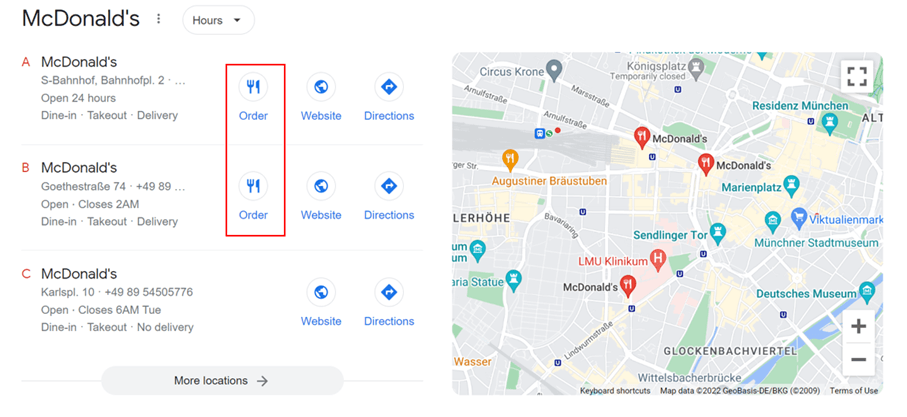
At this fast-food restaurant, customers can navigate directly to the order page from Google. (Image source © google.de)
If you can’t find certain features for your business, you may have selected the wrong category. You can select up to ten categories for your business.
You can also add attributes that might be important to your customers. For example, you can specify that your business is wheelchair accessible or offers free Wi-Fi.
Add products
If you sell products, you can post your current offerings in your business profile. These will then appear not only on your profile but also in Google Shopping.
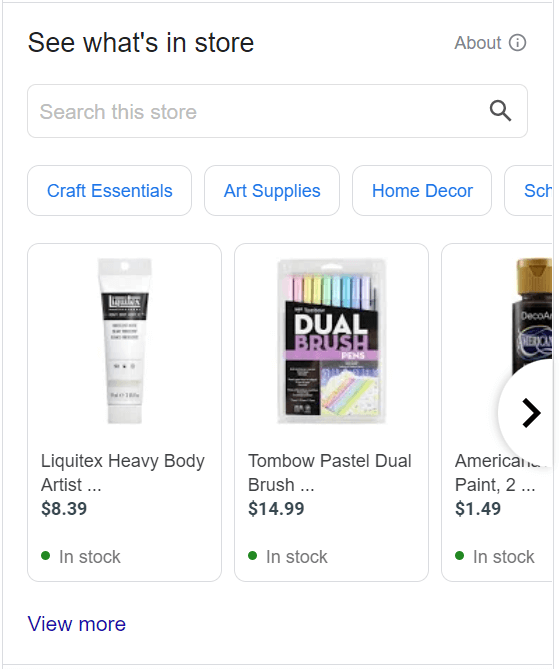
This is what the product overview looks like in the business profile (Image source © google.de)
To add products to your business profile, click “Products” in the menu on the left side of the dashboard. You’ll then have the option to add your first product.
Google’s Free Marketing Kit
Google offers businesses a free marketing kit that includes stickers, posts, and posters. You can even create your own video.
Google Q&A
Since 2018, customers have also been able to use the Questions and Answers feature to learn more about a business. However, it’s not just the business owner who can answer the questions—other users can too, since all it takes is a Google account to post a question or answer. This makes it all the more important for you, as the business owner, to respond to questions as quickly as possible and provide an accurate answer.
A quick response also makes a positive impression on other users, who can rate your answer with a “thumbs up.” The more likes a question has, the higher it appears in the list.
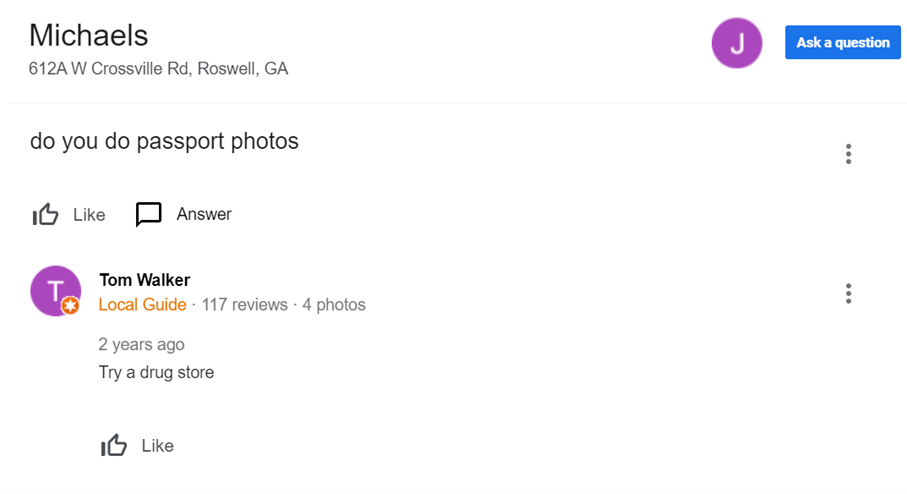
The “Questions and Answers” section looks like this, for example. (Image source © google.de)
Google My Business on other search engines: Microsoft Bing Places and Apple Maps Connect
Although Google has a large market share, it is, of course, not the only search engine on the market. Bing, Microsoft’s search engine, also offers business listings. Bing Places has been available to businesses since 2013 and is very similar to Google My Business.
As with Google, you must first request access to your Bing Places listing. Once your business is verified, you can enhance the listing with information and photos.
Apple Maps also gives businesses the option to create a listing via Apple Maps Connect. Although Apple users can also use Google Maps, Apple Maps is the default setting. That’s why you should also optimize your business listing for Apple Maps.
Conclusion
Google My Business is a local marketing tool you shouldn’t do without. Here’s a summary of why a professional Google My Business listing is so important:
- Improves your business’s visibility
- Makes it easier to attract new customers and get in touch
- Is a local SEO factor
If you don’t have a Google My Business account yet and have read this far, now is the time to create one.