

In a nutshell:
- Schema markup is the invisible framework that helps Google correctly categorize your content—FAQ, Article, Product, Organization.
- Without it, rich snippets remain out of reach and AI overviews favor the competition.
- We’ll show you which schema types have the greatest impact for B2B websites and how to implement them correctly.
Schema markup is one of the most effective methods for increasing your site’s visibility. Once you understand the basics of schema markup, you have the potential to improve your website’s ranking.
What is Schema Markup?
Schema markup is code that helps search engines identify which information on your website is relevant to search results. This helps search engines index content on your website more quickly.
You may be familiar with rich snippets: they work on a similar principle. Using rich snippets also leads to higher click-through rates and more traffic than regular search results.

This is what a rich snippet looks like in search results.
Schema markup tells the search engine what specific content means. For example, you can mark up the name of an organization, which tells the search engine that it’s an organization and not just random words. Additionally, you can highlight events, prices, locations, and more.
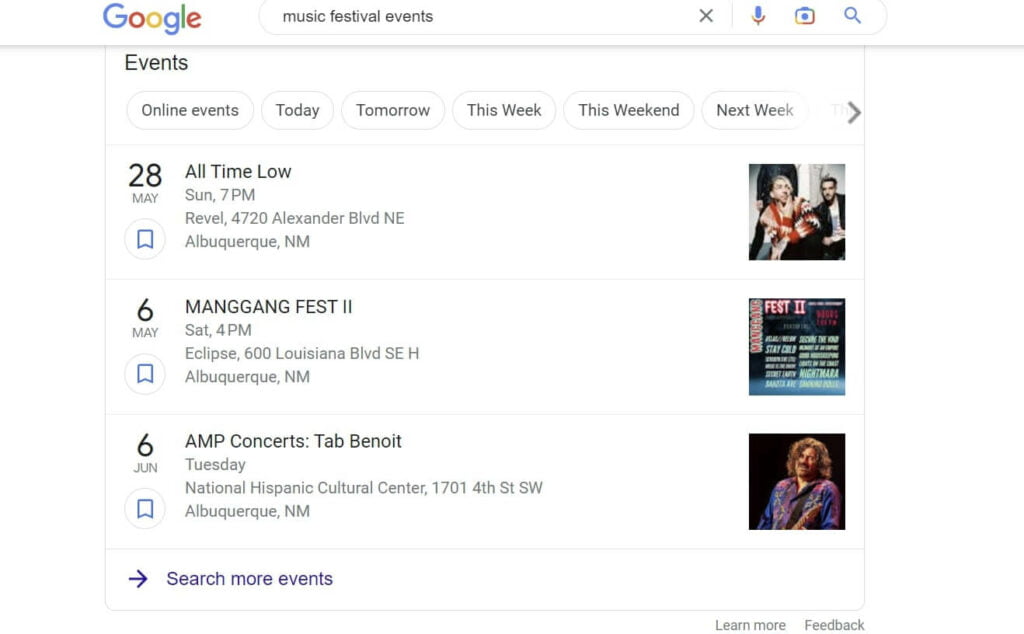
You can also use Schema Markup to display events from your website on the first page of search results.

This example shows how Schema Markup can be used to highlight prices in search results.
In summary: Schema markup is a form of structured data that allows webmasters to provide Google, Bing, and Yahoo with detailed information about a website’s content. The Schema.org organization provides a vocabulary for structured data that defines actions, information, or relationships.
Why is Schema Markup important?
Schema markup was developed for search engine users. The Schema.org organization was created through a collaboration between Google, Bing, Yahoo, and Yandex.
Schema markup plays a crucial role in improving your website’s visibility by allowing you to mark up your content using various data types.
Here is a list of data types supported by Schema Markup:
- Articles
- Restaurants
- Reviews
- Movies
- Events
- Products and Prices
- FAQ
- Local Businesses
This list could go on, however, as there are hundreds of markup types.
Studies show that websites that use Schema Markup appear, on average, four positions higher in search results (SERPs). However, it is not clear whether this is due to Schema Markup or other factors.
About one-third of search results on Google use rich snippets, which are also based on Schema Markup. In contrast, only about one-third of all websites use Schema Markup. Many websites are therefore missing out on huge potential.
How do you use Schema markup?
You don’t need any programming knowledge to add Schema Markup to your website. Instead, you can install a plugin that helps you select the right categories for your markup and generate the correct HTML code. However, if you’re new to search engine optimization, you shouldn’t dive straight into this topic, as it’s more of a tool for refining an SEO strategy.
Schema markup works best for webmasters of websites that already rank very well and whose content is well-suited for rich search results. Sites that are already well-known brands can further establish themselves thanks to schema markup.
The Benefits of Schema Markup for SEO
If you’re not quite convinced by Schema Markup yet, here are more reasons why you should use structured data.
Search engines understand Schema Markup better than plain text
Schema Markup consists of structured data that makes the Semantic Web possible in the first place. This data describes the content in greater detail and helps search engines understand it better. “Semantic Web” or “semantic SEO” refers to optimizing websites with many related keywords instead of just one keyword.
Improved visibility in search engines
Schema markup can improve a website’s visibility in search results. Thanks to the additional information about the page’s content, search engines can better assess a page’s relevance and rank it higher.
Users get better search results
Schema markup significantly improves the user experience by enabling search engines to present users with more relevant and meaningful search results. This can lead to users spending more time on a website and being more likely to return or recommend the site to others.
Higher click-through rate
Pages with structured data also have a higher click-through rate (CTR). Search engines receive additional information about a page’s content, leading to more appealing and meaningful results. Users are more likely to click on the search result, resulting in a higher click-through rate.
Types of Schema Markup
There are various types of Schema markup that target different aspects of a website. Here is an overview of the most common types:
Organization
Organization Schema Markup helps search engines capture important information about an organization, such as its name, address, phone number, and logo, and display it in search results.
Events
Event schema markup helps search engines provide detailed information about events, such as the date, location, and description. Users can access all the key details about an event directly in the search results.
People
Schema markup for people allows information such as name, job title, and contact details to be presented in a structured format. This helps improve the visibility of experts and influencers.
Products and Services
With product and service Schema Markup, details about products and services are displayed more effectively in Google search results. This includes, for example, prices, availability, and reviews. Internet users can find all the important information at a glance, which is more likely to lead to a purchase.
How to Implement Schema Markup on Your Website
Schema markup can be confusing at first, but with the right guidance, it’s easy to master. The following tips will help you get started with schema markup.
The Right Tools for Implementing Schema Markup
To implement Schema Markup on your website, you should first choose the right tools. Tools like Google’s Structured Data Testing Tool or Schema.org’s Markup Validator can help you find and test the appropriate data type for your content.
Here are a few Schema generators that can help with implementation:
Microdata Generator for Local Businesses: This tool helps local businesses use Schema Markup for their business listings.
JSON-LD Schema Generator: This schema generator makes it extra easy. Once the markup is generated, all you have to do is insert it into your website and test it.
RDFa: This HTML5 extension helps you highlight specific elements. RDFa also helps you create rich snippets from your website. Facebook’s Open Graph Protocol is also based on RDFa, which helps with the representation of places, events, or people.
Structured Data Markup Helper: This tool from Google helps you create markup for your website. All you have to do is select the data type and enter your website’s URL to generate Schema markup code.
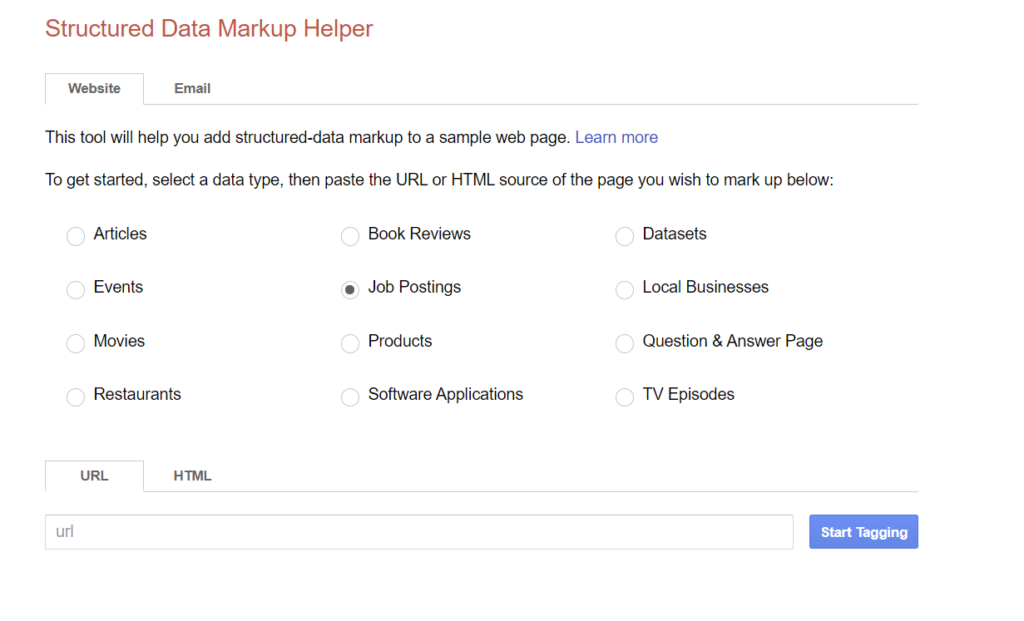
This is what Google’s Structured Data Markup Helper looks like.
Applying Markup to the Website
After marking up elements, the automatically generated HTML file can be inserted into the website. This can be done either manually (by adding the HTML code directly to the page’s HTML source code) or automatically (using plugins or specialized content management systems).
You can apply two different types at the same time. For example, you can use the main type “Person” as well as the type “Organization,” which tells readers who the person works for.
Additionally, properties can be used for different types. The “name” property can be used for both a person and an organization. Schema.org provides a complete list of schema properties.

According to Schema.org, these markup types are the most commonly used.
Testing Schema Markup
After you’ve added the code to highlight important data elements on your page, you should test it. Google provides this testing tool for structured data: Structured Data Testing Tool. Google recommends using the Rich Results Test first to see which content can be used for rich snippets. To test other types, you can then use the Schema Markup Validator.
More Schema Markup Tips
The more content you mark up, the better. Thanks to the wide variety of markup types, there is great potential for possible markups. However, you should only mark up content that is visible to users and not hidden in the backend.
Conclusion
You shouldn’t underestimate the importance of Schema Markup for SEO. Schema Markup improves a website’s visibility in search results, increases the click-through rate, and offers a better user experience. So familiarize yourself with the different types of Schema Markup and use the right tools to implement it successfully. Then your website can really take off.
Frequently Asked Questions
What is Schema Markup?
Schema markup is a form of structured data that provides search engines with detailed information about a website’s content. This helps search engines better understand a website and improves its presentation in search results.
Why is Schema Markup important for SEO?
Schema markup helps search engines better understand a website’s content. This provides internet users with more relevant search results. Websites benefit from improved visibility and higher click-through rates.
What types of Schema Markup are there?
The most commonly used types of Schema Markup are Organizations, Events, People, and Products and Services. The markup tells the search engine what this content really means.
How do you implement Schema Markup on your website?
When using Schema Markup, you should choose the right tools and find the appropriate Schema Markup for the specific content. The markup can then be added manually to the page’s HTML source code or implemented automatically via plugins or specialized CMS.
What benefits does Schema Markup offer for the user experience?
Schema markup improves the user experience by enabling more relevant and meaningful search results. Users spend more time on a website and recommend the site more often.